Entering the system
Once you are registered in the Alliance directory, you can at any given moment access it to update your information.
To do so:
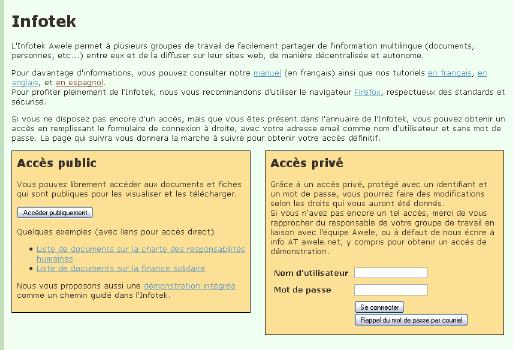
 Go to the database opening page. It is only available in French.
If your browser asks you if you want to accept a certificate, say “yes”.
In the lower right-hand box, enter the e-mail with which you are registered in the directory into the field “Nom d’utilisateur.”
After you enter your e-mail, click on the button “Se connecter.” Your password will be sent by e-mail to the address you entered. It will be a very long chain of letters and numbers.
Copy and paste the password into the second field, “Mot de passe.”
Click on the button “Se connecter.”
If this procedure does not work, you may have already had a password but do not remember it. In that case, after you enter your e-mail, click instead on the second bottom “Rappel du mot de passe par courrier.”
Changing the language
Once inside, you can change the language of the content to some extent. Development was stopped on the system before the different language versions were finalized, so you will get your language version for whatever was done to that point.
The two other partially available languages, besides French, are English and Spanish.
If English or Spanish is marked as your preferred language in your directory entry (“Langue 1”) you can change the content, insofar as it is translated, to that language.
To do so:
Click on “Paramètres personnels” in the left-hand column.
Check the box under the subtitle “Internationalisation”
Click the button “Changer”
Changing your password
We suggest you immediately change your password to one you can remember.
To do so:
Scroll down on the same page to the subtitle “Mot de passe” (which always remains in French).
Enter the password you were sent by e-mail (copy and paste) into the first field.
Enter your new password (at least 8 characters) into the middle field.
Re-enter your new password into the last field.
Click the button “Changer.”
Updating your data
Keep your data up to date.
To do so:
Click on “Directory” in the left-hand column.
Click on “Modify your personal data”
The interface there is in French but should be pretty self-evident.
When you are through, be sure to click the button at the very end of the page.
Fine tuning your indexation
If someone else is looking for all persons tagged, for instance, with “Fair trade”, or “Fight against poverty” and you want to be sure to be on that list, you need to ask us to add or remove tags from your entry.
To see the list of possible tags, go to the Directory page and click on “Launch an advanced search.” You will find them under “Indexation”: they are translated into English.
Documents and Info Sheets
All documents and info sheets are publicly available (entry through the left-hand box at the opening page), so you do not need to log in to consult or download them. Unfortunately, the search interface is only in French.




 Printable version